Edit MP4 video in your browser, free
Online MP4 Editor that reads the file where it is
An MP4 is a container, not a codec. Inside it there is usually H.264 video and AAC audio, sometimes HEVC from a recent iPhone, sometimes MP3 audio in a clip that came off a download site, plus an index called the moov box that records where every frame sits in the file and which frames are keyframes. This MP4 editor reads that index first and then pulls frames from the file on your disk as the timeline asks for them, a couple of megabytes at a time. A long screen recording is never copied into memory as a whole, and nothing is uploaded, because there is no server in the loop at any point.
Project picker
Multi-track editing with WebCodecs · Frame-accurate seek · Source monitor
New Project
About MP4 Editor
What that buys you in practice. A phone clip that stores its pixels sideways with a rotation flag opens upright, because the flag is read from the track header and applied in the preview and the export instead of being ignored. An MP4 whose index was written at the end of the file, which is what most recorders produce unless a fast start pass was run afterwards, still opens; the editor just has to find the index before it can show the first frame. HEVC footage opens when the browser and the machine can decode it, which covers Chrome, Edge and Safari on most recent hardware, and when they cannot the import error names the codec rather than showing a black frame. MP3 or other non-AAC audio inside an MP4 is decoded like any other sound and comes out as AAC.
What it does not do. Export always re-encodes: your cut goes through the browser's own H.264 encoder at the resolution, frame rate and bitrate you pick, so the output is a new file, not the original bytes with a piece removed. For a straight cut with nothing else changed, the trim tool copies the stream without re-encoding and is the better choice. This page is for the edits that need a timeline: several clips in a row, a crop, a title, music under a voice-over, or one long recording cut into pieces for Shorts and Reels.
Seen in the editor
When to use this editor
Phone footage that opens sideways elsewhere
Phones write landscape pixels plus a rotation flag. Many web tools drop the flag and show the clip on its side. Here the flag is honoured in the preview and the export, so the MP4 you save plays upright everywhere.
Long screen recordings
An hour of screen capture is a large MP4. Only its index is read up front and frames are fetched on demand, so you can scrub to the part you need, cut it out and export that section without waiting for the whole file to load.
Clips with odd audio inside
MP4 files from download sites and old converters often carry MP3 audio in a container that expects AAC, which is why some players stay silent. The editor decodes whatever the browser can decode and writes AAC on export.
iPhone HEVC clips
Recent iPhones record HEVC by default. On a machine with a hardware decoder the clip opens directly, and the export is H.264, which plays on devices and sites that still refuse HEVC.
One MP4 into several short clips
Open a long recording once, mark ranges in the source monitor, crop each to 9:16 and export a separate MP4 per clip for Shorts, Reels or TikTok.
An MP4 that a site keeps rejecting
Re-exporting through this editor produces H.264 video with AAC audio at a fixed frame rate and a bitrate you choose, which is the shape upload pipelines expect. Check the original with the keyframe checker first if you want to know what was wrong with it.
How to Edit an MP4 Video Online
1 Open a new project
Click New Project. A blank timeline opens in your browser tab with no login step.
2 Drop the MP4 onto the source bin
The editor reads the file index, shows the clip in the source monitor, and fetches frames from your disk as you scrub. Nothing is uploaded.
3 Cut, crop and add what you need
Place the clip on the timeline, split it at the playhead, delete the parts you do not want, crop or reposition it, add a title or a music track.
4 Export as H.264 MP4
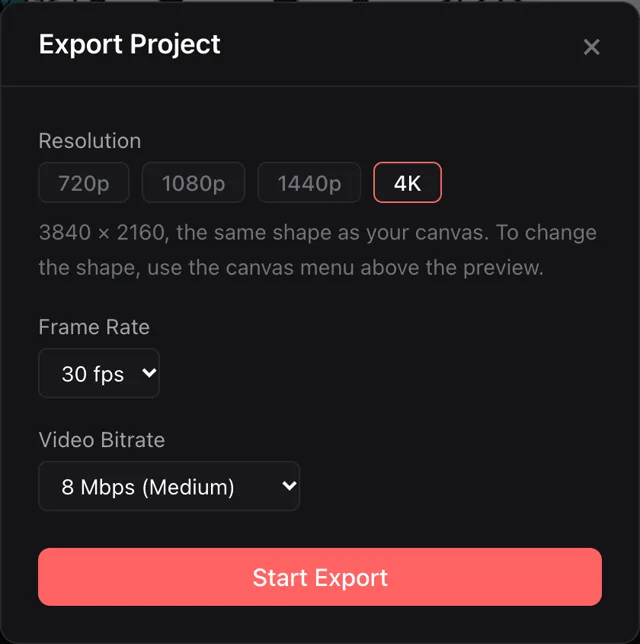
Click Export, choose a resolution up to 4K, a frame rate and a bitrate. The encode runs on your device and the new MP4 is saved to your disk.
Frequently asked questions
Does editing an MP4 here re-encode it?
Yes, every export is a fresh H.264 encode at the settings you pick in the export dialog. That is what makes crops, titles and transitions possible. If all you need is a cut, the trim tool copies the stream without re-encoding and keeps the original quality exactly.
Which MP4 files open?
Anything with H.264 video opens in every supported browser. HEVC opens where the browser has a hardware decoder for it, which is most Macs and recent Windows machines in Chrome, Edge and Safari; Firefox usually cannot. Audio can be AAC, MP3 or any other codec the browser decodes. MOV and WebM files open too. MKV and AVI do not.
Is there a size limit for the MP4?
No fixed cap. Video frames are read from the file on demand, so a large file is not loaded into memory. Sound is the part that lives in memory: an hour of decoded stereo audio takes over a gigabyte, so a very long recording on a laptop with little memory is the case to watch. Trim it first if the editor struggles.
Why does my MP4 look sideways in other online editors but not here?
Your phone recorded the pixels in landscape and stored a rotation flag in the track header telling players to turn the picture. Tools that ignore the flag show it sideways. This editor reads the flag from the file and applies it when drawing the preview and when writing the export.
What export settings should I use for an MP4 that uploads cleanly?
1080p at 30 frames per second and 8 Mbps covers YouTube, Instagram, TikTok and most web players. Pick 16 Mbps if the source was high quality and you want to keep more detail, and 60 frames per second only if the source was shot at 60. The dialog greys out combinations your device cannot encode.
Will the exported MP4 be as sharp as the original?
It cannot be sharper, and at a low bitrate it will be softer. A re-encode always loses a little. At 16 Mbps for 1080p or 32 Mbps for 4K the loss is hard to see. For a plain cut with no other changes, use the trim tool, which does not re-encode at all.
Can I edit only the audio inside an MP4?
The sound sits on its own track on the timeline, so you can trim it, lower it under a voice-over or replace it, and the export writes it back as AAC. If you want the sound as a separate file, the MP4 to MP3 tool pulls it out without touching the video.
Why does one of my MP4 files fail to open at all?
The usual reason is a missing index. When a recorder crashes or a phone runs out of battery mid-recording, the moov box never gets written and the file has no map of where its frames are. No editor can open that file as it is; a repair tool that rebuilds the index has to run first.
Is the MP4 editor free, and is there a watermark?
Free, with no watermark at any resolution and no account to create. The file stays on your device the whole time, which is also why there is nothing to sign up for.
Your video never leaves your device
All processing happens locally in your browser, and your files never leave your device. The editor reads your video file through a standard browser file input, holds the bytes in memory, decodes and re-encodes them with WebCodecs inside the tab, and writes the final MP4 back to your disk. No upload, no cloud rendering, no external copy.
Related Tools and Resources
Trim video
A straight cut without re-encoding: the stream is copied, so the quality stays exactly as it was.
Online video editor
The full feature rundown of the same editor: tracks, transitions, filters, text and export options.
Compress video
Make a finished MP4 smaller for an upload limit or an email.
MP4 to MP3
Pull the sound out of an MP4 as a separate file.
Video keyframe checker
Read the codec, keyframe interval and frame rate of an MP4 before deciding what to do with it.
Variable to constant frame rate
Fix a phone recording whose frame timing drifts before editing it.
Fast start and the moov box
Why the index at the end of an MP4 is a problem and what moving it costs in memory.
Scrubbing huge files without blowing up memory
How the timeline keeps a file bigger than your RAM responsive.